
Images stay on your Mac
Screen captures used to read your IDE never leave the device. We don’t upload, store, or sell screenshots.
Voice OS for IDE & terminal CLI
Never wonder what your AI is doing again — in Cursor, VS Code, or terminal agents like Gemini CLI, Copilot CLI, Claude Code, Codex, Aider, and JetBrains CLI. It narrates every step while it works.
Free 7-day trial · no card required · Keys stay on your desktop
Not coding? Voice writing on your phone →
Live session · Mac
DemoWorks with IDE & CLI









The wedge
Same task. One leaves you staring at a spinner. The other keeps you in the loop with live narration you can interrupt.
~4×
shorter to hear
You hear a comprehensive spoken update — not the agent’s entire messy chat dump.
~1.5s
from voice to the IDE
After you stop talking, the prompt lands. No click, no paste.
0 clicks
to send or stop
Say the task — it goes. Say stop — it stops. Nothing gets typed as code.
Without Devoxal
muteGenerating…
Still working…
…
Almost?
You watch the spinner and hope nothing broke.
With Devoxal
speakingSearching your auth middleware…
You hear every step — then barge in when you want a change.
Terminal CLIs
Not just Cursor and VS Code. Speak to Gemini CLI, Claude Code CLI, Copilot CLI, Codex, Aider, or JetBrains CLI — hear the agent while it works, barge in from your Mac or phone.
Live session · terminal CLI
DemoHow it works
Like a teammate who narrates as they work — not a silent agent that hijacks your keyboard for thirty seconds.
01
Say what you want changed, in plain language, hands off the keyboard.
02
Your agent — Cursor, Claude Code, VS Code, or a terminal CLI like Gemini, Copilot, Codex, Aider, JetBrains — makes the change in real time.
03
You hear every step as it happens — searching, editing, testing — so you never have to guess.
Features
Each capability gets its own stage — product in view, one job per section.
Live narration
While the agent works, you hear the plan and the progress — searching, editing, testing — not a silent wall of diffs.
Live narration
Conductor, not dictation
Devoxal routes voice into the right action — prompt, stop, new chat, approve — so coding intent isn’t treated like a transcript.
Voice → action
You said
“stop”
Devoxal does
Pressed Stop in Cursor
Text paste
Flip the HUD from Agent to Text paste and your words land in whatever field has the insertion point — Slack, a commit box, a comment, a browser form. No agent Sync, no auto-submit. Switch back to Agent when you want the IDE to talk back.
HUD · mode
Insertion point · Slack
Message #eng
Ship notes: auth retry is live.
Pasted · not sent to the agent
Autopilot
Say what you want in plain English. Autopilot turns it into a checklist, then pilots your agent stage by stage — so you’re not sitting there tapping Continue. Same list on Mac and on your phone. Pause, edit a stage, or stop anytime.
Autopilot · Driving Cursor
0/6 stages · agent working in the IDE
SpokenDriving Cursor · Scaffold HTML, CSS, and JS files
Scaffold HTML, CSS, and JS files
In CursorStyle the dark UI
ViewEditShow the remaining time
ViewEditAdd Start, Pause, and Reset
ViewEditBeep when the timer ends
ViewEditStore today's session count
ViewEditAnywhere with internet
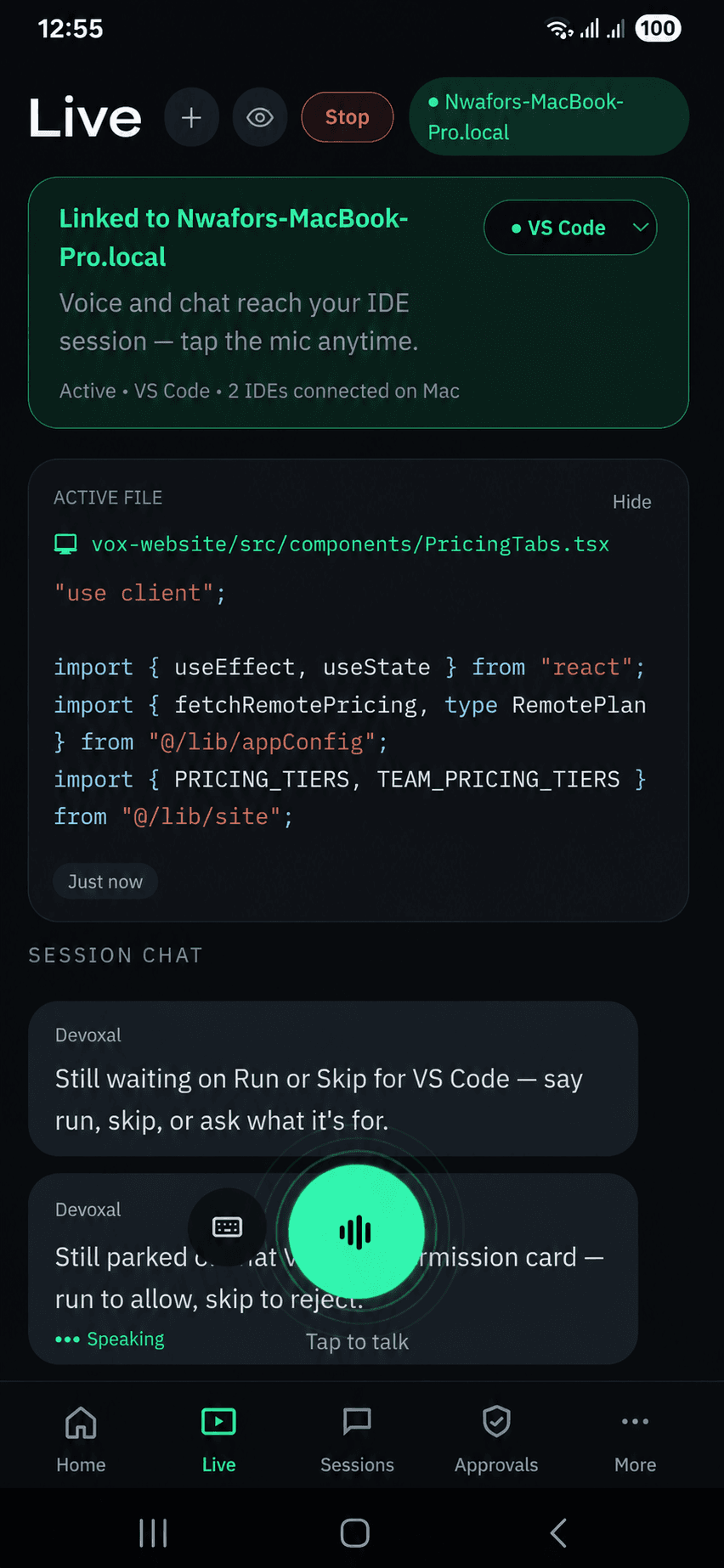
You don’t need to sit next to your Mac. Phone ↔ cloud ↔ your machine: as long as the Mac is online and your IDE is synced, you can speak and hear the same live session from a flight, a café, or across town.
Command Center
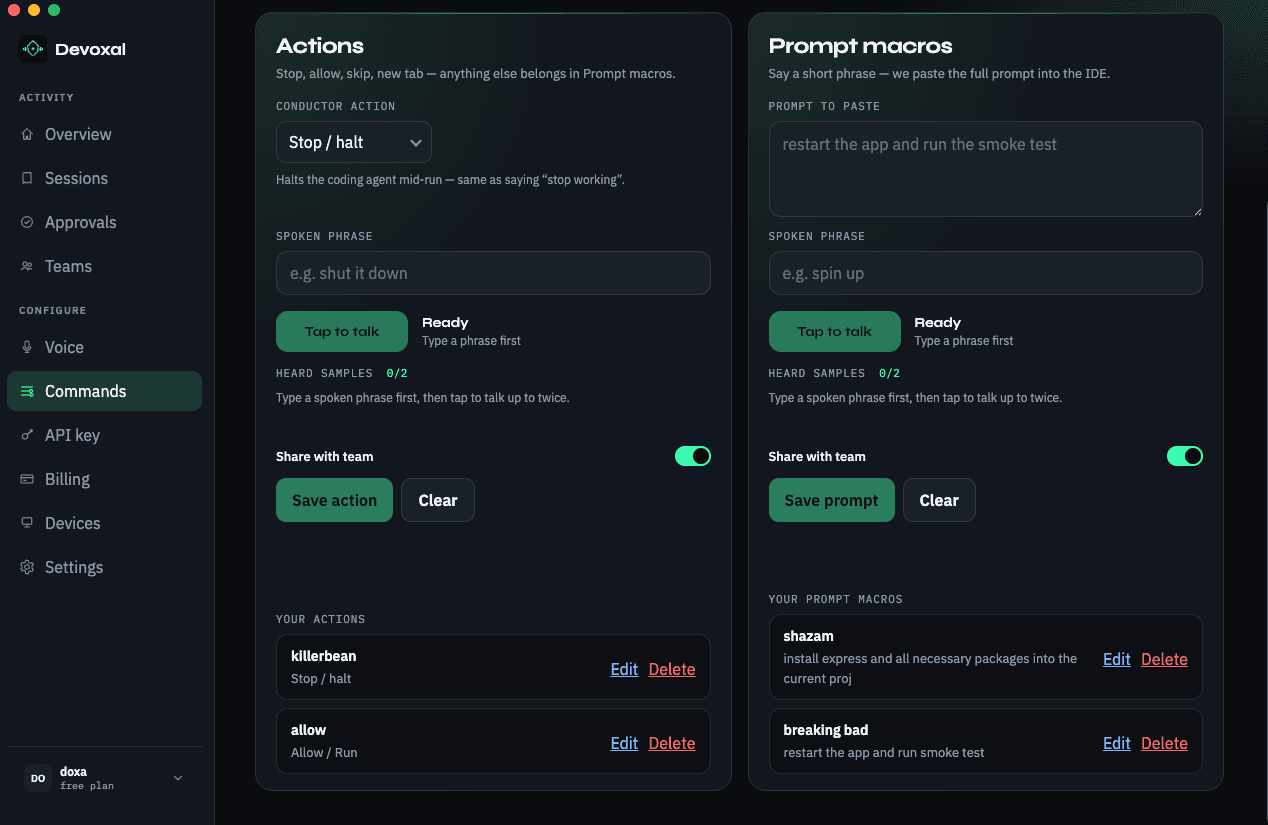
Map spoken phrases to conductor actions and full IDE prompts — trained on exactly how you say them. Share with the team so everyone gets the same shortcut without long notes or memorizing paste-bins.
Your words, your actions
Instead of only “stop,” say killswitch — or whatever sticks. Tap to talk trains samples on your voice.
Prompts behind a phrase
Say spin up — we paste the full prompt into the IDE. Keep the long version once; speak the short one forever.
Handover for teams
Share with team once. New seats get the same actions and prompt shortcuts — no Slack threads of “what’s the magic phrase?”
Privacy by default
Screen captures and API keys stay on your Mac. We don't sell your data, and we don't train models on your sessions.
Screen captures used to read your IDE never leave the device. We don’t upload, store, or sell screenshots.
Bring-your-own OpenAI keys live in your Mac settings / keychain — not on our servers, not shared across a team.
Your voice, code, and session data aren’t a product. We don’t sell or rent what you do in Devoxal.
We don’t train models on your prompts, narration, or IDE screens. Your sessions aren’t our dataset.
Details in our Privacy policy and FAQ.
FAQ
Start coding with an AI that keeps you in the loop. Free for 7 days with your own key — no card required — on Mac. Windows coming soon.
Platform overview
Devoxal is a hands-free voice operating system for AI coding tools — built so your IDE talks back. It sits between you and GUI agents like Cursor, Claude Code, Windsurf, and VS Code, plus terminal CLIs including Gemini CLI, Claude Code CLI, Copilot CLI, Codex CLI, Aider, and JetBrains CLI: speak a task, it goes to the agent, you hear a short spoken update while it works, and you can barge in anytime.
Privacy is local-first: screen captures and bring-your-own API keys stay on your Mac. We don’t sell your data and we don’t train models on your sessions. Start on Mac with a menu-bar HUD; continue the same session from your phone over the internet — you don’t need to sit next to the computer, only that the Mac stays online with your IDE or CLI synced.